A LoRaWAN setup tale of spring 2024
Prolog
Late of autumn 2024, year of the dragon, company off-site. While scratching our heads to get an idea to implement during a hackathon, a colleague of mine introduced me to the world of LoRa and LoRaWAN.So what is this about? IoT devices need a way to exchange information, by forming a *local* network. In our daily lives, we use Wi-Fi to connect our devices in our LAN. This is expensive, both in terms of energy and computation power. LoRaWAN networks like The Things Network, solve this issue using LoRa.
For those new to IoT you might find these terms confusing, like I did. To save you some clicks:
LoRa is the radio signal that carries the data - i.e. a physical layer.The idea was simple, yet fresh: make a PoC (proof of concept) to prove that it's possible to make blockchain transactions over a LoRaWAN network. It revolved around Sui's ability to extend its' functionality with internetless transactions.
LoRaWAN is the communication protocol that defines how that data is sent across the network - i.e. a transport layer.
The solution would consist of two steps:
- Setup a simple LoRaWAN network with an end-node and gateway.
- Create a flow of creating, signing and executing a transaction to the blockchain.
We ordered the equipment and waited for it to be delivered. And we waited... We waited... until no time remained, so we dropped the idea and continued working on something else. The so-anticipated hardware arrived the last day of the hackathon, which was obviously too late. We decided to get the equipment back to our home-offices and start working on it when our capacity allowed it. The offsite ended, I returned to Athens, and got back to my projects at the time which demanded a lot of our time and there was no space for any experimentation. I still had an itch though. Something that revolved around my mind and I would constantly get back to when daydreaming about project ideas.
What if I made the first steps of the implementation?I had a hard time seeing all those goodies just laying around on the shelf. So I decided to give it a go. How hard could it be? I just wanted to set up a single-node network plus send the hex encoded bytecode of a transaction. "Piece of cake!". "Low hanging fruit!" And other deceptions. Turns out that I would be thrown for a loop!
Equipment
Let's start from the equipment: I was supplied with- (2) Raspberry Pis 4b
- (1) RAK2245 Pi HAT WisLink LPWAN Concentrator
- (1) Adafruit Feather M0 RFM95 LoRa Radio
- (1) Adafruit LoRa Radio Bonnet with OLED - RFM95W
- Some other peripherals like TX/TR and GPS antennas.
And the LoRaWAN Odyssey begins!
Gateway setup
To test if a network works, you first need to start from the receiver. In my case, I would first need to set up the LoRaWAN gateway. If the gateway would work as expected, i.e. show up in The Things Network console and reply to status messages, then that would enable me to check if the end nodes work too.The first step was to assemble the gateway parts. Got one Raspberry Pi 4B and attached on top of it the RAK2245 HAT. Connected the antennae both for signal accumulation and gps and that was it.
Then for the software part, I would have to follow the official quickstart guide of RakWireless. The steps would be to install a headless Raspbian OS to the Raspberry Pi, then ssh into it and install the RAK2245 HAT's software by cloning the repo and running the install script.
So far so good, or so I thought! Having followed the instruction steps, the gateway doesn't show up in the TTN console.
Time for some troubleshooting. I open up the good old
journalctl and inspect my ttn-gateway service:
$ sudo journalctl -u ttn-gateway
rak-gateway ttn-gateway[2890]: WARNING: [main] impossible to open /dev/ttyAMA0 for GPS sync (check permissions)
(...)
rak-gateway ttn-gateway[2890]: ERROR: [main] failed to start the concentrator
/opt/ttn-gateway/packet_forwarder/lora_pkt_fwd/start.sh
Let's dive deeper:
# Stop the automatic start of the service.
sudo systemctl stop ttn-gateway.service

# Check out the output of the packet forwarder
sudo bash -x /opt/ttn-gateway/packet_forwarder/lora_pkt_fwd/start.sh

+ SX1301_RESET_BCM_PIN=22
+ echo 22
start.sh: line 6: echo: write error: Invalid argument
+ echo out
start.sh: line 7: /sys/class/gpio/gpio22/direction: No such file or directory
+ echo 0
start.sh: line 8: /sys/class/gpio/gpio22/value: No such file or directory
+ sleep 0.1
+ echo 1
start.sh: line 10: /sys/class/gpio/gpio22/value: No such file or directory
+ sleep 0.1
+ echo 0
start.sh: line 12: /sys/class/gpio/gpio22/value: No such file or directory
+ sleep 0.1
+ echo 22
start.sh: line 14: echo: write error: Invalid argument
+ ./set_eui.sh
+ sleep 0.2
+ sleep 0.5
+ ./lora_pkt_fwd
*** Beacon Packet Forwarder for Lora Gateway ***
Version: 4.0.1
*** Lora concentrator HAL library version info ***
Version: 5.0.1;
***
To find the correct value of the Raspberry Pi's GPIO pin, I would need to check the official documentation for RAK2245. Looking at page 5, the GPIO pin of Raspberry Pi that should be used is GPIO 17:
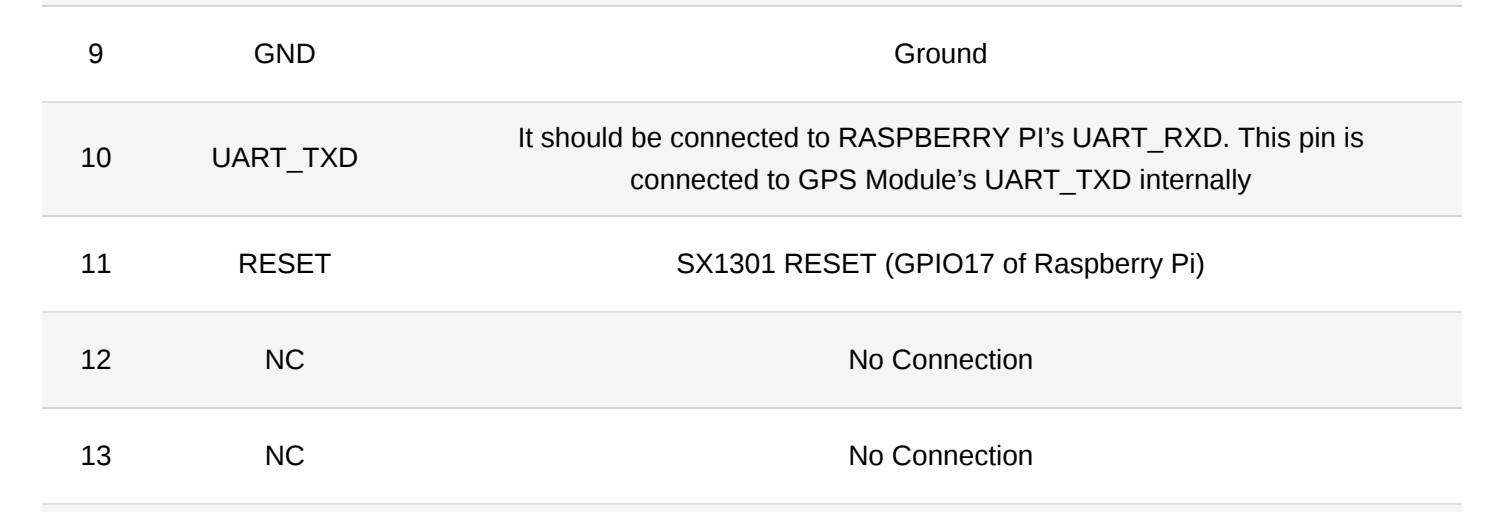
The fix is simple! Just change the value inside
/opt/ttn-gateway/packet_forwarder/lora_pkt_fwd/start.sh
to SX1301_RESET_BCM_PIN=17. Updated the files, rebooted, logged in the TTN console and... no GPS signal!
That was an easy fix though. The output from journalctl indicated that there was no such
/dev/ttyAMA0, which I confirmed it using ls /dev/.
Repeating the gateway-config process, I saw that
there was a file being edited called global_conf.json.
When I switched the value from /dev/ttyAMA0 to /dev/serial0, which actually
existed in my machine, it worked.
End node setup
The gateway was up and running, so it was time to set up the end node. Starting from the adafruit RFM95W bonnet, I connected it to a Raspberry Pi Zero WH. H stands for header, which means that the board comes with the GPIO pins already soldered, minimizing the risk to damage my boards with my inexperienced hands.Next step was to make sure that the bonnet was recognized by the Raspberry Pi. This was done by following the adafruit's setup instructions which comprised of installing CircuitPython Libraries and testing the connectivity (not its' capability to transmit) of the bonnet with a `rfm9x_check.py` script, in combination with installing blinka. It worked fine (so far!), with the OLED being lit up and displaying the "Ada", "Fruit", and "Radio" for each button pressed respectively.
Time to transmit some data - or not?
Looks like adafruit's library is not compatible with the TTN's v3 stack anymore.
Quoting adafruits' guide:
The LoRaWAN part of this Guide is deprecated and is no longer possible! Single-channel packet forwarders no longer work after the Things Network migration to The Things Stack v3. For more information about this decision, visit: https://www.thethingsnetwork.org/forum/t/single-channel-packet-forwarders-scpf-are-deprecated-and-not-supported/31117Bummer.
Before reaching a deadend, my first approach was to look into GitHub and discover if there are some open-source libraries from independent programmers that could help me out. In my search for salvation, I found BNNorman/CircuitPython-LoRaWAN which was made for microcontrollers which run Circuit Python.
My raspberry pi zero can’t run circuit python, it's a single board computer - not a microcontroller. As an alternative I used the adafruit blinka library which provides an API to other hardware such as single board computers. But this API was very limited and deprecated, resulting to errors. I tried to migrate the library to the best of my abilities, but I was not able to make it work. The changes I had to make were too many, making hard to not introduce errors.
At this point I had one board left in my disposal: an adafruit feather RFM9x m0. This is a microcontroller, but can’t run circuit python because it is based on an ATSAMD21G18 ARM Cortex M0 processor, clocked at 48 MHz and at 3.3V logic, the same one used in the new Arduino Zero. Running circuit python would be convenient because I could use the CircuitPython-LoRaWAN codebase from approach 1, but no such luck. In the end, I succumbed to the fact that an Adafruit product would not be able to connect to the TTN v3 stack, so I decided to start from scratch and research the TTN v3 stack's recommended devices. I decided to use a The Things Uno board, which is based on the Arduino Leonardo with an added Microchip LoRaWAN® module. It is fully compatible with the Arduino IDE, so that I could experiment with it.
I patiently waited for the board to arrive, and when it did, I started immediately, following the instructions of the setup guide word by word. I connected the board to the computer, booted the gateway, and started the Arduino IDE. I copied the code from the guide, and uploaded it to the board. The code was simple, and was supposed to transmit the status of the onboard led to the gateway. I uploaded the code, and waited for the results. If you have read the previous paragraphs, you would have noticed a pattern. And that pattern repeated itself once again: Even though the board was transmitting successfully, the gateway would not receive anything. The TTN console was empty! (╯°□°)╯︵ ┻━┻
Being frustrated I decided to start walking back and forth in my room, holding the laptop and the board in my hands, trying to figure out what was wrong. I was about to give up, when I though about some comments I read in the TTN forum about distance and gateway to end node visibility. Even though I was in the same room already and hypothetically close enough, I decided to move the board closer to the gateway, around 4 meters from it, with direct visibility, not a single chair in between this time and ... voila!
The gateway started receiving some led states!
Finally I had a complete setup!
The next step was to setup a pipeline that a webhook application would listen to the TTN v3 stack and make move calls to a Sui smart contract. But that's a story for another post!